Available Now
PDF Quick Kit
Essential PDF tools for Windows — without a subscription.
Opens the Microsoft Store · free 7-day trial
Focused Windows tools that remove friction from the work you do every day — without clutter or a steep learning curve.
Each app starts with one question: what would make this task faster and less frustrating on Windows? The result is focused desktop software instead of bloated subscriptions.
Explore all appsEssential PDF tools for Windows — without a subscription.
Opens the Microsoft Store · free 7-day trial
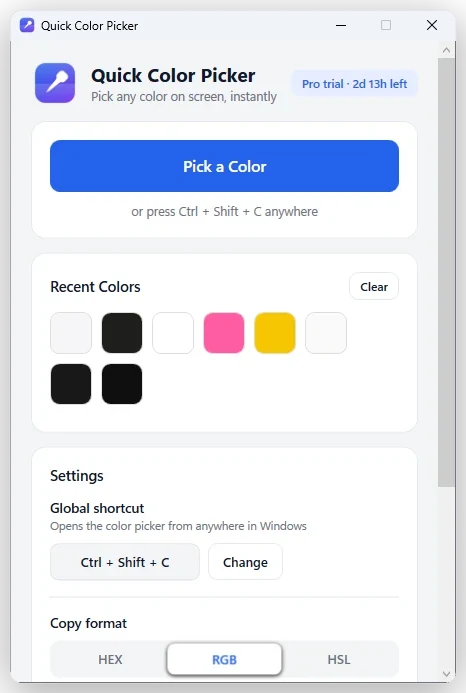
Pick any color on your Windows screen in seconds.
Opens the Microsoft Store · free 7-day trial
Compress and convert images in batches — without uploading them.
Opens the Microsoft Store · free 7-day trial
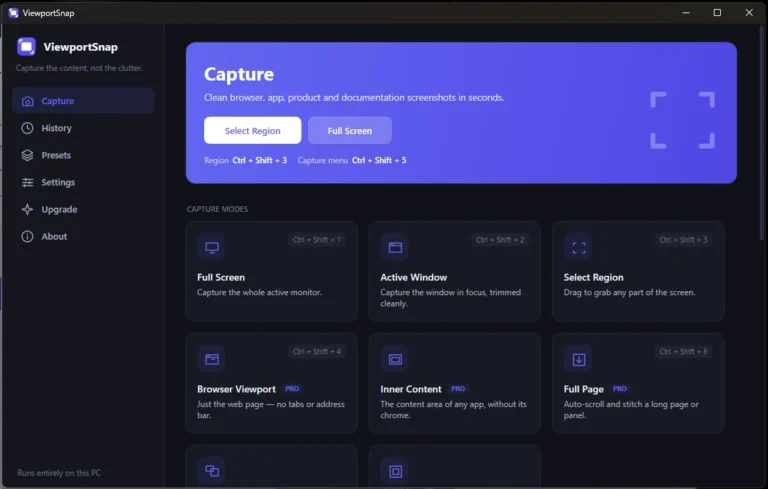
Capture clean Windows screenshots — from a region to a full scrolling page.
Opens the Microsoft Store · free 7-day trial
Everything you copy, searchable and local.
Opens the Microsoft Store · free 7-day trial
Search inside your files, not just their names.
Opens the Microsoft Store · free 7-day trial
A tidy desktop that never moves a file behind your back.
Opens the Microsoft Store · free 7-day trial
Batch-rename and package assets — on copies, by default.
Opens the Microsoft Store · free 7-day trial
Type it once. Reuse it forever.
Opens the Microsoft Store · free 7-day trial
Gigabyte logs, read locally.
Opens the Microsoft Store · free 7-day trial
Explain what is on your screen clearly.
Opens the Microsoft Store · free 7-day trial
Compact Windows tools designed to remove friction, protect your workflow, and stay out of the way.
Clear controls, sensible defaults, and no lengthy setup before you can get real work done.
Wherever possible, files are processed locally on your PC instead of uploaded elsewhere.
Focused apps without unnecessary accounts, bloated menus, or features in your way.
A free 7-day trial on the Microsoft Store, so you can see if it fits before buying.
DreamFast Apps is the Windows software home of DreamFast Themes. We turn familiar frustrations into focused desktop tools — then refine every screen until the experience feels simple.
PDF Quick Kit, Quick Color Picker, Image Compressor & WebP Converter, ViewportSnap, DreamFast Clipboard, DreamFast Document Search, DreamFast Desktop Organizer, AssetPack Studio, DreamFast QuickText, DreamFast Log Viewer and DreamFast ScreenGuide are available now on the Microsoft Store for Windows.
From the Microsoft Store. Open an app’s product page and select “Get it on Microsoft Store” to install it on your Windows PC.
Yes. Every released DreamFast app includes a free 7-day trial through the Microsoft Store, so you can try every feature before deciding.
Pricing is shown on the Microsoft Store listing, where the purchase is handled. Start with the free 7-day trial to try it first.
On your PC. Several DreamFast apps are built to work locally, so the files you open stay on your machine rather than being uploaded to us.
Billing, updates, refunds and system requirements are covered in full on the support page.
Small tools that do one job, sold once, that run on your own machine. The reasoning behind how DreamFast Apps are built,…
Read article Why We Build Focused Windows Apps Without SubscriptionsPrint Screen gives you a raw grab of everything. ViewportSnap gives you the region, the window, the browser viewport or the whole…
Read article Introducing ViewportSnap: Cleaner Screenshots on WindowsGrabbing an exact colour from your screen should not require opening a design app. A global shortcut, a magnifier, and a value…
Read article Introducing Quick Color Picker: Pick Any Screen Color in SecondsPDF Quick Kit, Quick Color Picker, Image Compressor & WebP Converter, ViewportSnap, DreamFast Clipboard, DreamFast Document Search, DreamFast Desktop Organizer, AssetPack Studio, DreamFast QuickText, DreamFast Log Viewer and DreamFast ScreenGuide are available today on the Microsoft Store. Get release updates and hear about the next app first.